
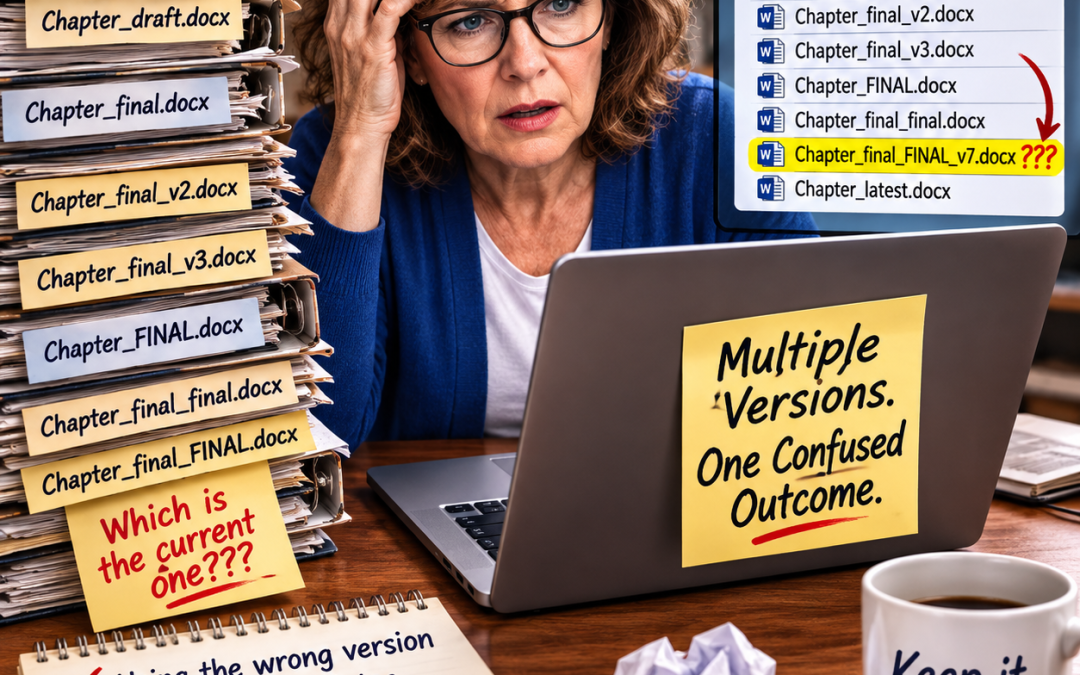
A client came to me recently in a bind. He’d been working on his book for months, revising chapters, sending them to a publishing company, getting feedback from the editor, and saving new drafts whenever an idea struck him at midnight.
By the time he reached out to me, he had six or seven versions of some chapters, saved under names like “Chapter 3,” “Chapter 3 new,” “Chapter 3 final,” and “Chapter 3 FINAL FINAL.” None of the file names told him which one actually was final.
Neither did the content — he’d made edits across versions, so one file had a stronger opening, and a different file had a better case study, and he couldn’t remember which parts he’d already fixed and which he’d only meant to fix.
He made edits in earlier versions of chapters without paying attention to the file date, and thought he was editing the most current version.
When he contacted me, he was very confused about the chapters and the mess he’d created by not labeling his drafts. He lost months of work and concluded he had to rewrite his book before he could give it to me to edit.
I’ve seen versions of this story more than once, and it’s worth talking about, because the fix is so much easier than the cleanup.
Why Version Control Issues Happen
Most nonfiction authors aren’t writing a book in one sitting. You’re working around client calls, speaking engagements, and everything else that fills your calendar. You draft a chapter in March, revise it in June, then again in September after a piece of feedback changes your thinking. Each time, it’s tempting just to hit save and move on. You think you’ll remember which version is current.
Except you won’t. Not three months later, and not after your writing coach, a beta reader, or a collaborator has weighed in with their own set of comments and their own copy of the file.
What Gets Lost Without Clear Labeling
The obvious cost is time — my client’s rewrite took far longer than a straightforward edit would have. But the less obvious cost is trust in your own material.
When you’re not sure which version reflects your latest thinking, you start doubting decisions you have already made.
- Did I cut that anecdote for a reason, or did I just forget to bring it over?
- Was that argument stronger before I revised it, or after?
- Did I already use that story in another chapter?
You end up re-deciding things you’d already settled, which is exhausting and slows the whole project down.
There’s also a real risk of losing your best writing. If your strongest paragraph lives in a version you later abandon, and you don’t realize it until you’re deep into a different draft, that paragraph may never make it into the finished book.
I’ve watched this happen. Authors don’t lose their worst material this way — they lose good material, because good material tends to appear in the drafts where they were most engaged, and those aren’t always the ones that survive.
A Simple System That Prevents All of This
You don’t need complicated software to solve this. You need a habit to manage version control.
Date every file name. “Chapter 3_2026-08-20 PW” tells you more in five seconds than “Chapter 3 final” ever will. Dates sort chronologically and never lie about which one came later. In the file title above, the author’s initials are PW. When you work with an editor, adding your initials to the file indicates you were the last person to work on and save the file.
Edit only the most recent version of the file. Treat earlier versions of the material as a locked file. You can read it but not touch it.
Reserve the word “final” for the file that’s actually final. Once a manuscript goes to your editor or to print, that’s the only file that earns the label—everything before it is a draft, no matter how good it feels in the moment.
Keep a single working folder, not a scattered one. If drafts live in your inbox, your desktop, your downloads file, and a shared drive with a collaborator, you’ve already lost the thread. Pick one location and move every new version there immediately.
Note what changed, briefly. A single line — “added client story, cut the second example” — saved in the file at the top of the first page of the chapter or in a running log takes ten seconds and saves you from re-reading three versions side by side to figure out what’s different.
Decide who owns the master copy. If you’re working with an editor, a ghostwriter, or a coauthor, agree up front on which one of you maintains the current version and how updates get shared. Confusion about ownership is where a lot of this trouble starts.
Once you turn the chapter over to the editor, do not touch it again. Resist all urges to tinker with it. If you modify the chapter while the editor is working with it, you will spread the version control disease.
The Real Point
None of these points about version control are about being tidy for its own sake. It’s about protecting your work. Every chapter you write represents your effort — researching, structuring content, and finding the right words for an idea that mattered enough to put in a book. Losing track of which version holds that work means doing some of it twice.
My client’s book is on track now, but he’ll tell you how painful it was to rewrite his book. Conforming to labeling discipline at the start would have saved him from ever needing to start again.
 Pat Iyer MSN RN LNCC is a consultant, speaker, author, editor and book coach. She has written or edited 73 of her own books and worked with dozens of authors as an editor and book coach. Her most recent books include AI-Powered Video for LNCs book and workbook.
Subscribe to Pat’s Substack account at this link for her latest posts and notes on The Writer’s Toolbox.
Pat is an Amazon international #1 bestselling author. Coaches, consultants, and speakers hire Pat to help release the knowledge inside them so that they can attract their ideal clients.
She delights in assisting people to share their expertise by writing. Contact her at http://patiyer.com/contact
Good idea on putting the date in the title of each saved version. I’ve gotten confused by not doing that.
I’ve used “working draft” and then numbered them. How many working drafts does a person need? 1 of course but I ended up with 2 plus another version titled something else.
I would look at the date of when I entered each document last. That didn’t help if I had entered it just to look at something and it wasn’t to add new information.
The cycle continues until I took all but the latest version and moved the others to another folder.
You make things sound so easy and your suggestions always work.
Thank you for assisting us all.
Now to decide if I am going to really start a book- hmmm?